
Anyone who’s traveled internationally without a reliable local data plan knows the specific stress of realizing, mid-trip, that the maps app relied on for the entire journey needs an internet connection to actually function. It’s a common, avoidable gap — most travelers assume their phone’s maps will just work wherever they go, without realizing that turn-by-turn navigation and live map data both typically require an active connection, which isn’t guaranteed on arrival, especially in areas with limited coverage or when deliberately avoiding expensive roaming charges.
Understanding What “Offline Maps” Actually Covers
It’s worth being precise about this before relying on it, since the term gets used a bit loosely. A properly downloaded offline map region typically provides the map itself (streets, points of interest, general layout), search functionality within that downloaded area, and turn-by-turn navigation for driving, walking, and often cycling, all without requiring any live connection.
Setting Up the Core Workflow
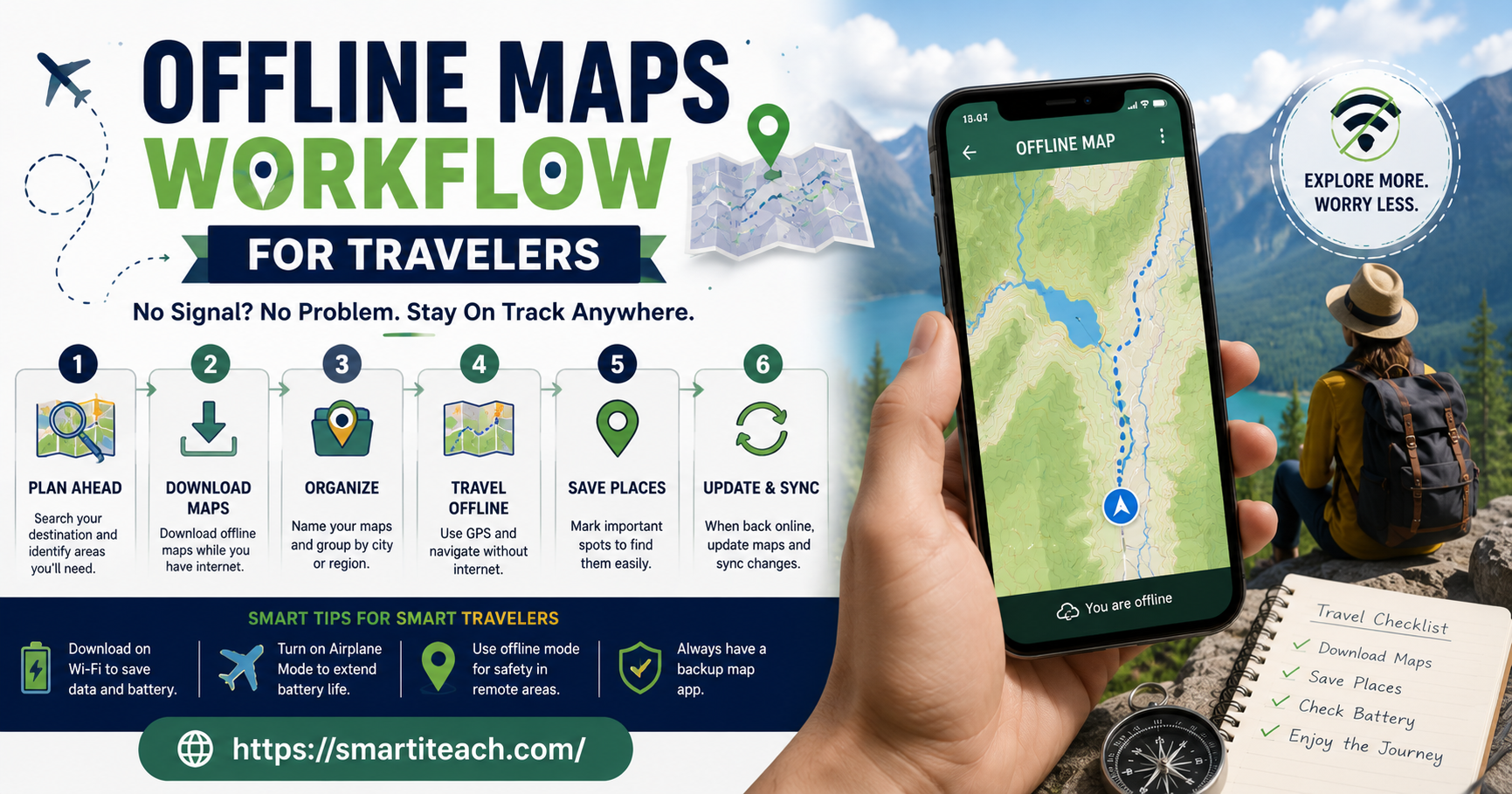
Download map regions before departure, not on arrival.
This sounds obvious but is worth stating directly, since a common mistake is assuming there will be a convenient moment to download maps after arriving, when in fact the arrival period — navigating an unfamiliar airport, finding transport into a city — is often exactly when a data connection is least reliable and most needed. Downloading relevant regions while still on a reliable home connection removes this risk entirely.
Download a broader area than the specific planned itinerary.
Plans change during travel more often than expected — an unplanned day trip, a change in route, an unexpected detour. Downloading a wider surrounding region, not just the exact planned route, provides useful flexibility if plans shift once actually traveling, at a relatively small cost in extra storage space.
Check the downloaded region’s actual boundary carefully before departure.
Most offline map tools show a preview of exactly which area will be included before downloading, and it’s worth actually checking this rather than assuming a downloaded city region extends further than it does. A day trip destination just outside a downloaded region’s boundary defeats the purpose if it wasn’t specifically checked and included in advance.
Handling Multiple Destinations Across a Trip
Organize downloads by trip leg, downloaded progressively rather than all at once if storage is a concern.For a multi-destination trip, downloading an upcoming region a day or two before arrival there, using whatever connectivity is available at the current location, keeps storage use more manageable than downloading an entire multi-country itinerary’s worth of maps all at once before departure, though downloading everything upfront is also entirely reasonable if storage space isn’t a genuine constraint.
Saving Specific Locations for Fast Access
Save key locations accommodation, key meeting points, the return airport as pinned or saved points before departure.
Beyond just having the map downloaded, saving specific important locations directly within the app makes them instantly findable without needing to search or recall an exact address while offline, which matters especially in a moment of stress or genuine disorientation in an unfamiliar place.
Save locations progressively during the trip as they become relevant.
not just the ones known in advance — a restaurant recommendation received from a local contact, an interesting spot noticed while exploring — so that returning to a place later doesn’t require remembering an exact name or address without a live search available.
Backup Approaches Worth Having
A secondary, different offline maps app as a genuine backup, not just the primary app alone.
App-specific issues do occasionally occur — a corrupted download, an app crash, a device issue affecting one specific app — and having a completely separate backup app with its own independent offline maps downloaded provides genuine redundancy rather than relying entirely on a single point of failure.
A basic physical map or printed key information as a final fallback for genuinely critical situations.
This sounds old-fashioned, but for travel to remote areas or situations where phone battery or device failure would be a genuine problem, having some non-digital backup — even just a printed map of a key area, or written directions to critical locations like accommodation — provides a fallback that doesn’t depend on any device functioning at all.
Managing Battery and Storage Realistically
Offline map downloads consume meaningful storage, worth checking device capacity before a trip with many planned regions.
A detailed map download for a large city or region can represent a genuinely significant amount of storage space, and it’s worth checking available device storage before departure, particularly for trips involving many different regions, to avoid running out of space mid-trip when it’s least convenient to manage.
Navigation, even offline, still consumes meaningful battery, worth planning for.
GPS and screen use during active navigation draws battery regardless of whether a data connection is active, so offline maps don’t solve battery management on their own — a portable charger remains a genuinely relevant piece of a complete offline navigation setup, not something offline maps make unnecessary.
What Still Requires Some Connectivity, Worth Planning Around
Real-time public transit information typically still requires a connection, Even with offline maps otherwise working well, since transit schedules and live delay information are generally live data rather than something meaningfully useful to download in advance given how frequently it changes.
A Reasonable Pre-Trip Checklist
Before departure: download offline map regions for all planned destinations, with a genuinely wider boundary than the exact planned itinerary, verify the downloaded region’s actual coverage before leaving reliable home connectivity, save key locations (accommodation, key meeting points, return transport hubs) as pinned points within the app, set up at least one backup offline maps app with its own independent download, and confirm available device storage comfortably accommodates all the planned downloads.
The Bottom Line
An offline maps workflow removes one of the more common and entirely preventable sources of travel stress — the assumption that navigation will simply work wherever a trip goes, only to discover otherwise at exactly the wrong moment. A small amount of deliberate preparation before departure, done while still on reliable home connectivity, provides genuine navigation reliability throughout a trip regardless of local connectivity, cost of roaming data, or coverage gaps in more remote areas, and it costs nothing beyond a few minutes of setup and some manageable device storage space.